2026
Amazon Product & Review Intelligence
Scrapes Amazon listings and reviews, then answers questions about them in plain English. A self-query retriever pulls the constraint out of your sentence and applies it as a real filter. Built end to end, guardrailed, containerised and running on an EC2 box.
The problem
Product research on Amazon is a reading problem more than a search problem. Which complaints keep coming up across hundreds of reviews? Which of the cheap products actually hold their rating? The answers are spread across more pages than anyone will sit through. Semantic search on its own doesn't help either, because most of these questions have a hard number buried in them: under ₹500, below 3 stars, more than a thousand ratings. Similarity search treats those as suggestions.
Running system
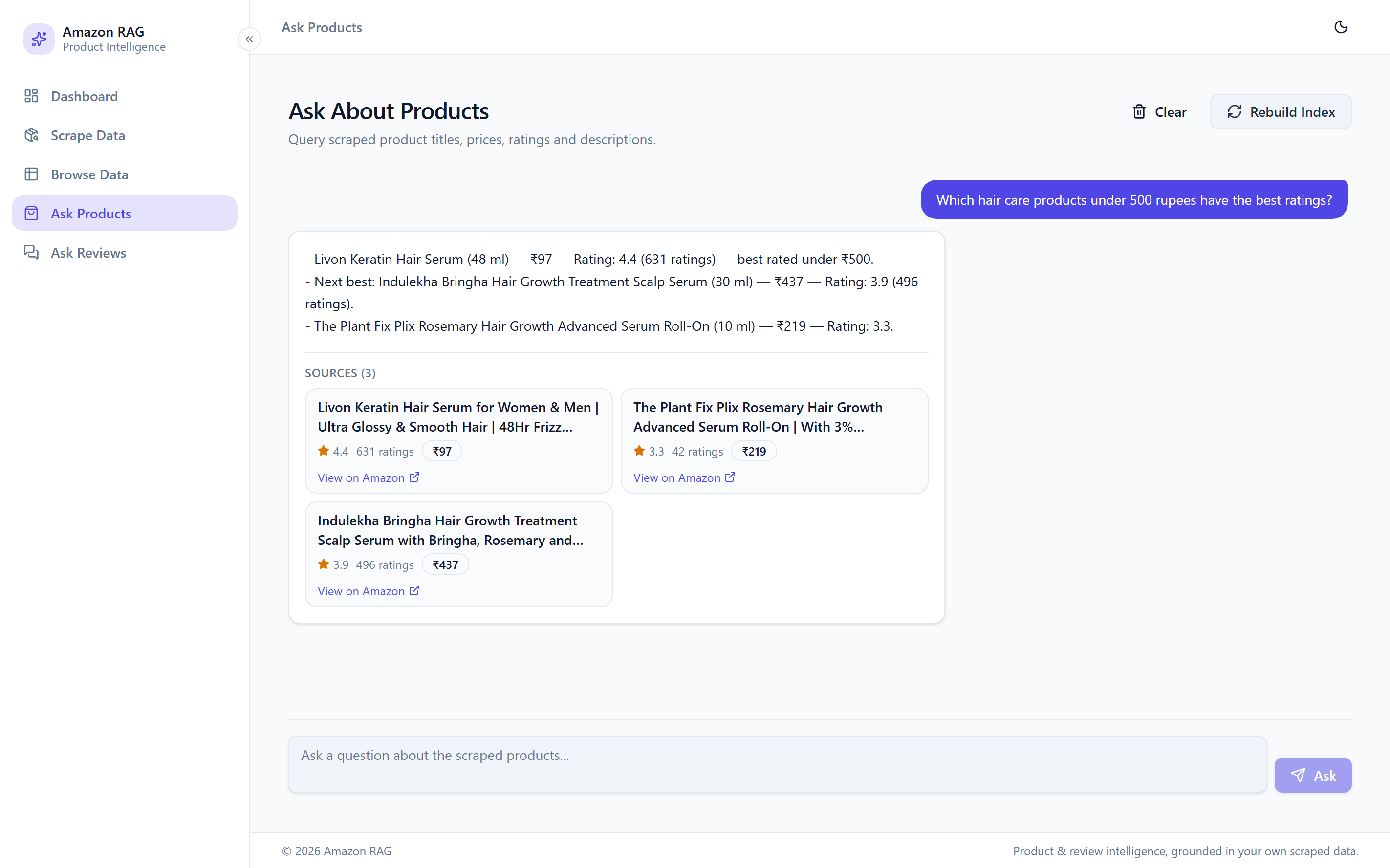
“Under 500 rupees” becomes a real filter rather than a similarity guess. Every result comes back under the cap, and the answer cites the products it used. 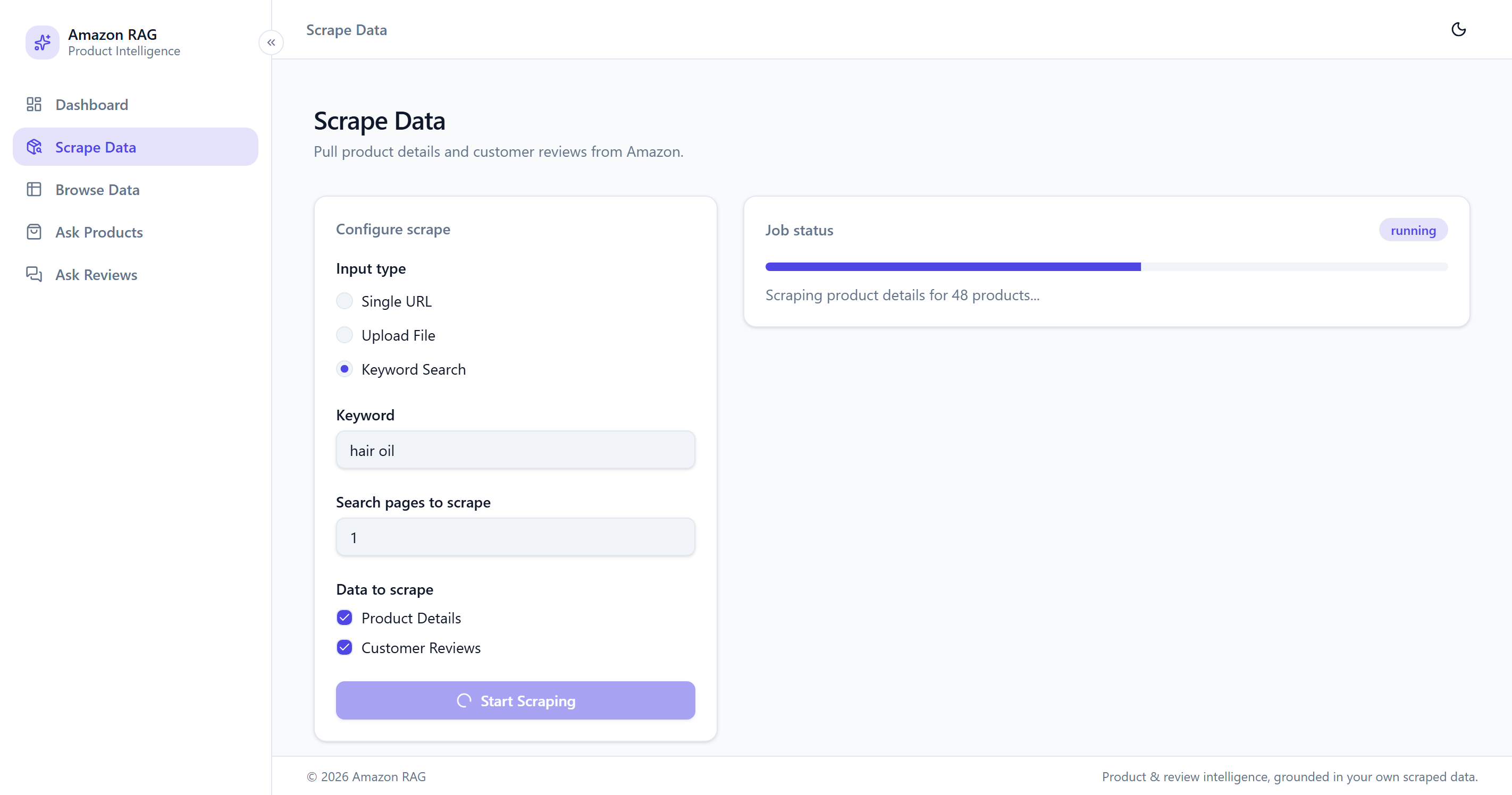
Keyword search ingesting listings and reviews straight into SQLite 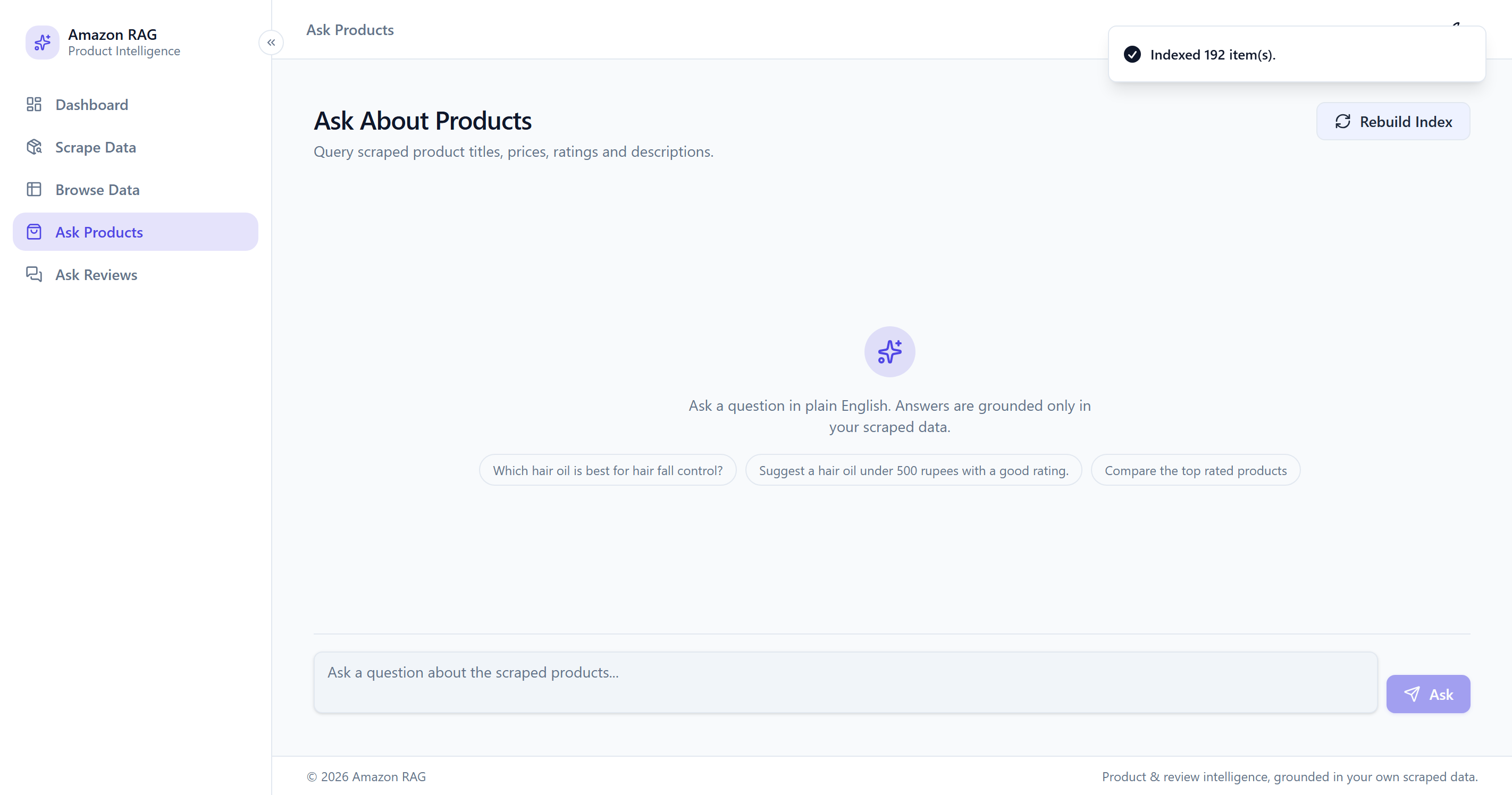
Reindexing 192 items without restarting the app
Architecture
- 01
Selenium drives a real Chrome session. You can point it at a single product URL, upload a list of them as Excel, or just hand it a search keyword.
- 02
Everything lands in SQLite first. Re-running a scrape updates existing rows instead of appending copies, so scraping the same product twice doesn't quietly corrupt the dataset.
- 03
Products and reviews go into two separate Chroma collections, each with its own self-query retriever tuned to the fields that collection actually has.
- 04
The retriever pulls the filter out of the question, applies it, and hands what survives to the model. Answers cite the products they came from.
- 05
Questions pass an on-topic and jailbreak check before retrieval runs; answers pass a PII redaction and toxicity pass before they reach the browser.
- 06
The whole thing — FastAPI backend, built React bundle and a headless Chromium for the scraper — goes into one Docker image and runs on an EC2 instance behind Uvicorn.
Decisions that mattered
Two vector collections, not one
Products and reviews carry different metadata. One side has price, rating and number of ratings; the other has author, rating and date. Putting them in a single collection means one retriever has to reason about a set of fields that only half its documents actually have, and self-query retrievers handle that badly. They will filter on a field the document never had. Two collections means each retriever only ever sees a schema it can trust. I haven't benchmarked the difference, but the wrong-document answers I kept getting stopped.
Self-query retrieval over plain similarity search
"Reviews rated below 3 stars" isn't really a semantic query, it's a WHERE clause. Cosine similarity will cheerfully hand back a glowing five-star review for it, because that review is textually similar to every other review. The self-query retriever parses the number out of the sentence and applies it as a metadata filter, so the constraint gets enforced instead of approximated.
Cookie-based session reuse instead of scripted credentials
Scripting the login form means storing credentials, and then losing anyway the first time a CAPTCHA or 2FA prompt appears. Saving a browser session as cookies and replaying it avoids both problems: no credentials in the repo, and no challenge-handling code to keep alive.
Reindex as a UI action, not a restart
The slow part of building this wasn't the pipeline, it was the loop: scrape, restart the app, re-embed everything, ask again. Making reindex a button that only embeds new rows took most of that wait out. After that I actually bothered to try more than one chunking and retrieval setting.
Guards on the way in and on the way out, doing different jobs
The two directions fail differently, so they can't share a strategy. On the way in, an off-topic question or a prompt-injection attempt should just be refused, because running retrieval on it wastes an embedding call and gives the model a reason to improvise — so those validators raise and the request stops. On the way out, refusing is the wrong move: the answer is already correct and useful, it just happens to quote a reviewer by name. So the output validators repair instead of reject, redacting PII and stripping toxic sentences. Same library, opposite on_fail behaviour, and getting that split right mattered more than which validators I picked.
One image with Chromium inside it, rather than a scraper service
A Selenium scraper needs a real browser, which is the part that usually makes these projects undeployable — it works locally and dies the moment it leaves your machine. Splitting it into its own service would mean a second container, a queue between them and a protocol to keep in sync, for one app with one user. So the browser is installed in the image alongside the API and told to run headless. The frontend is built in a separate Node stage and only its output is copied across, which keeps npm out of the final image entirely. Two things then had to be dealt with properly: the Guardrails validators live on a token-gated package index, so they install through a BuildKit secret mount rather than a baked-in token, and the ALBERT and spaCy weights they rely on are downloaded at build time so the first request doesn't pay for it.
State on volumes, not in the image
SQLite and the Chroma store are bind-mounted rather than baked in, so rebuilding the image doesn't throw away a scrape that took twenty minutes. That's also what makes the container disposable: I can rebuild and restart on the EC2 box without re-ingesting anything. `scripts/backup.sh` snapshots both directories and keeps the last seven, which guards against me corrupting the data rather than against losing the disk.
Stack
- Retrieval
- LangChainChromaDBOpenAI EmbeddingsSelf-Query Retriever
- Ingestion
- SeleniumBeautifulSoupSQLite
- Safety & Eval
- Guardrails AIPresidioDeepEvalpytest
- Interface
- ReactViteTypeScriptTailwindFastAPI
- Deployment
- DockerDocker ComposeAWS EC2Uvicorn